
Tested on multiple installs to fix these three known input issues


METHOD 1:
I have condensed these steps into a simple Batch [.bat] file you can download and run to fix the issue in a few seconds. I’m mainly doing this for documentation and a quick scan of the <10 lines in a text editor can see it whats going on. It has to be run as Admin. Which I cant recommend you ever do with a strangers BAT or EXE ever! But you can also use the commands as a guide and do it yourself.
TITLE Windows Search Hotfix
echo Windows Search Hotfix (No Restart Required.. But also might be)

echo Requires to be run as ADMIN. ALWAYS Do You Research before running as ADMIN.

echo Close now to cancel script, or
pause

::Must be run as ADMIN
cmd.exe --command PowerShell.exe -ExecutionPolicy Unrestricted

Get-AppXPackage -AllUsers |Where-Object {$_.InstallLocation -like "*SystemApps*"} | Foreach {Add-AppxPackage -DisableDevelopmentMode -Register "$($_.InstallLocation)\AppXManifest.xml"}

echo "Get-AppXPackage -AllUsers |Where-Object {$_.InstallLocation -like "*SystemApps*"} | Foreach {Add-AppxPackage -DisableDevelopmentMode -Register "$($_.InstallLocation)\AppXManifest.xml"}"
pause

cmd.exe C:\Windows\system32\ctfmon.exe

echo Check Again!!
echo You can Either CLOSE or PRESS ENTER to launch CMD.exe
pause
cmd.exe
:EXIT
exit
::This was abridged quickly so is simple as Pi and just as messy.
METHOD 2:
::Adding Registry Entry via CMD.exe (2 Methods)
LAUNCH Command Prompt by pressing Win+X and selecting Command Prompt (Admin)

ALTERNATE CMD.EXE (Admin)

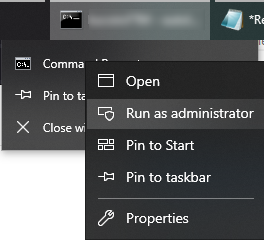
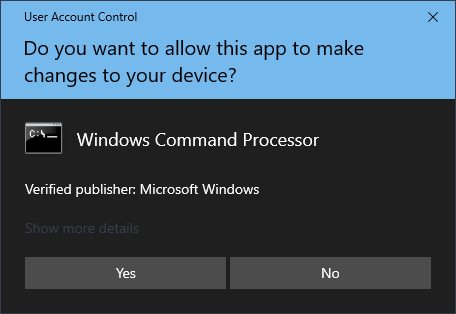
Run command below in cmd.exe (admin)
REG ADD HKEY_LOCAL_MACHINE\SOFTWARE\Microsoft\Windows\CurrentVersion\Run /v ctfmon /t REG_SZ /d "C:\Windows\system32\ctfmon.exe"

::Copy to desktop (creates shortcut)
Right Click > Send to Desktop (Create Shortcut)
::Place shortcut into Startup folder
C:\ProgramData\Microsoft\Windows\Start Menu\Programs\StartUp\”ctfmon.exe”
This process makes a fantastic batch to be easily replicated and enjoyed as needed. May be ready to enjoy immediately. May need to reboot and allowed to set. Drizzle with caramel or crushed Oreo’s. Makes fantastic leftovers.
 TwiceBakedTech
Leave a comment